
Do you use Odoo or want to learn how to manage your website directly from your ERP?
The moduleOdoo Websiteallows you to create pages, publish blog articles, design contact forms, manage multiple languages, and optimize your SEO without advanced technical skills.
However, many companies only utilize a portion of the available features. Teams often remain dependent on an external provider to modify content, publish news, or create a new page.
AOdoo Website trainingallows you to quickly gain autonomy and master the essential features to effectively manage your website on a daily basis.
Whether you are a manager, marketing director, Odoo administrator, or business user, understanding how the Website module works will help you improve your visibility, save time, and better leverage your Odoo environment.
In this guide, we will discover the skills to acquire, the essential features to master, and the concrete benefits of training dedicated to the Odoo Website module.
Why take an Odoo Website training?
Today, the website has become a strategic tool for the majority of companies.
Prospects seek information even before making contact. They consult the services offered, read blog articles, download resources, or fill out contact forms.
The website is often the first point of contact with your business.
Yet, many organizations remain dependent on external parties to make sometimes simple changes.
Training allows you to take control of your tool.
Gaining autonomy in site management
One of the primary benefits of Odoo Website training is autonomy.
After appropriate skill development, users are able to:
- create a new page;
- modify existing content;
- add images;
- update information;
- publish a blog article;
- integrate a form.
This autonomy reduces delays and allows the site to evolve at the pace of the company's needs.
React quickly to changes in activity
Businesses are constantly evolving.
A new offer is launched.
An event needs to be communicated.
An article needs to be published.
When teams master the Odoo Website module, they can intervene immediately without waiting for a service provider.
This responsiveness represents a significant advantage in a competitive environment.
Developing visibility on Google
Search engine optimization largely depends on a company's ability to produce quality content.
A trained team can:
- publish more articles;
- create optimized pages;
- answer prospects' questions;
- gradually improve its visibility.
Training thus directly contributes to the company's SEO strategy.
Who is an Odoo Website training aimed at?
The Website module concerns several profiles within an organization.
Depending on each person's objectives, the skills to be acquired may differ.
Marketing and communication managers
Marketing teams use the website daily to promote the company's offerings.
Training allows them to:
- create campaign pages;
- publish content;
- manage forms;
- improve SEO;
- analyze performance.
The goal is to gain autonomy and efficiency.
Odoo Administrators
Administrators must understand the entire Odoo environment.
For the Website module, this notably involves:
- managing settings;
- user rights;
- connections with the CRM;
- multilingual features;
- SEO tools.
This mastery ensures consistent use of the platform.
Executives and business managers
Many leaders want to understand how their site works in order to better manage their digital strategy.
Training allows them to:
- understand the possibilities offered by Odoo;
- track performance;
- identify improvement opportunities;
- manage their online presence more effectively.
Business users
Some teams are required to regularly interact with the site.
For example:
- human resources;
- sales department;
- marketing;
- communication.
Tailored training allows them to manage their content without relying on a third party.
Essential skills to master in the Odoo Website module
Good training is not just about learning to click on different menus.
The goal is to understand how to use the Website module in a communication, marketing, and business development context.
Create and modify professional pages
The first skill is knowing how to create and update the site's pages.
Users learn to:
- create a new page;
- modify existing content;
- organize sections;
- publish changes.
This mastery forms the basis of autonomy in the module.
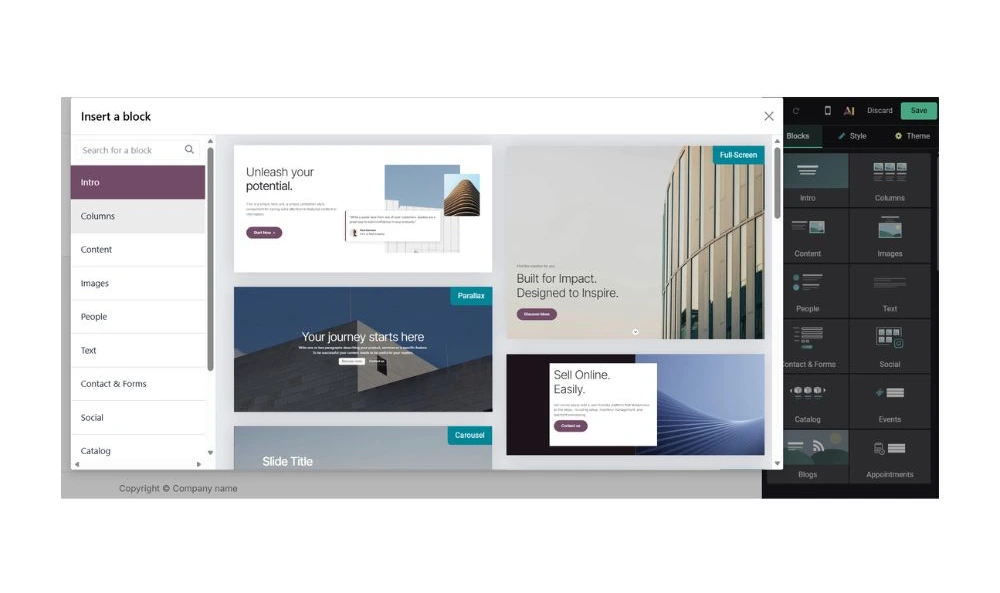
Use the drag-and-drop visual editor
The visual editor is one of the main assets of the Website module.
Thanks to its drag-and-drop functionality, it is easy to add:
- text;
- images;
- videos;
- buttons;
- testimonials;
- forms.
This approach significantly simplifies content creation.
Effectively structuring a web page
Creating a page is not enough.
It also needs to be pleasant to view and achieve its goal.
Training also allows you to learn:
- the hierarchy of content;
- the organization of sections;
- best UX practices;
- calls to action;
- elements that promote conversion.
These concepts are essential for creating an effective site.
Table of skills developed during an Odoo Website training
| Skill | User level | Advanced level |
|---|---|---|
| Edit a page | ✓ | ✓ |
| Create a page | ✓ | ✓ |
| Add content | ✓ | ✓ |
| Create a form | ✓ | ✓ |
| Optimize SEO | ✓ | |
| Manage multiple languages | ✓ | |
| Connect the CRM | ✓ | |
| Create a landing page | ✓ |
Why have these skills become essential?
The website now plays a central role in the buying journey.
Before contacting a company, prospects search for information, review the services offered, and assess the credibility of the organization.
The more a company is able to quickly update its content, the more effectively it can meet the expectations of its market.
This autonomy also allows for:
- improving visibility;
- publishing more content;
- optimizing conversions;
- reducing costs related to external interventions.
Mastering the Odoo Website module is therefore a true performance lever for companies looking to develop their digital presence.
Learning to create forms connected to the Odoo CRM
One of the main advantages of the Odoo Website module is its ability to interact with other ERP applications.
Among the most appreciated features is the creation of forms connected to the CRM.
For many companies, the contact form is the main source of lead generation. However, it is still common for requests to be handled manually by email.
With Odoo, it is possible to fully automate this process.
Creating a professional contact form
During an Odoo Website training, participants learn to:
- add a form to a page;
- customize the fields;
- configure the requested information;
- adapt the form to a specific business need.
For example:
- request for a quote;
- request for a demonstration;
- registration for an event;
- downloading a guide.
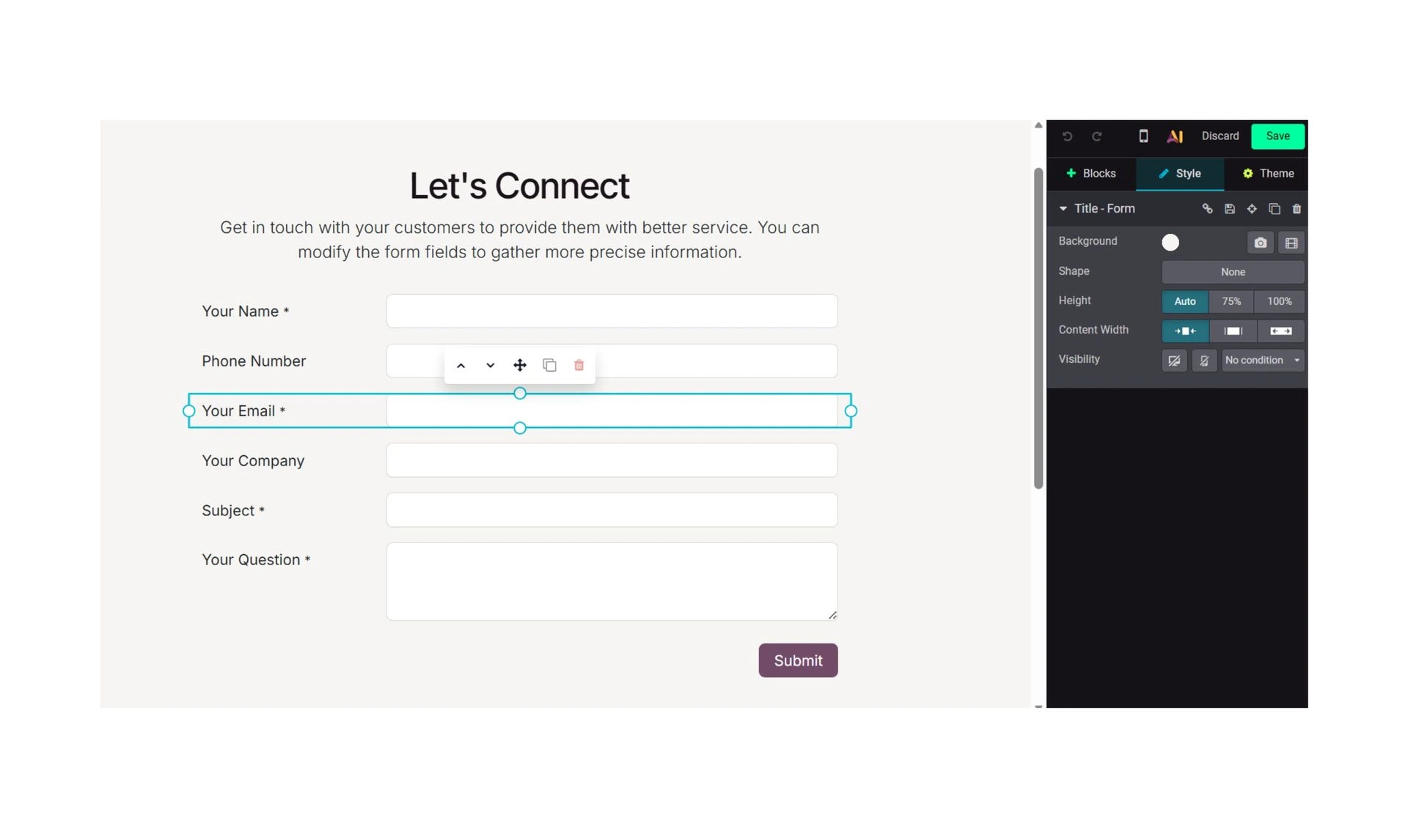
Automatically connect the form to the CRM
Once the form is created, it can be linked to the Odoo CRM.
When a visitor fills in their information:
- a lead is created;
- an opportunity can be generated;
- a business activity can be scheduled;
- a notification can be sent.
This automation significantly improves the responsiveness of sales teams.
Understanding the stakes of lead generation
The training is not limited to the technical aspect.
Participants also learn how to use forms in a lead generation logic.
The goal is to understand:
- what information to ask for;
- how to limit drop-offs;
- how to improve the conversion rate;
- how to effectively qualify requests.
Training in natural referencing with Odoo Website
Creating a website is the first step.
It still needs to be visible on Google.
Natural referencing is currently one of the most profitable acquisition levers for businesses.
The Odoo Website module includes many tools to optimize SEO.
Understanding the fundamentals of SEO
Training allows you to discover:
- how search engines work;
- search intent;
- keywords;
- the structure of a page;
- the relevance criteria.
This understanding facilitates the creation of high-performing content.
Optimize the site pages
Participants learn to configure:
- SEO titles;
- meta descriptions;
- URLs;
- H1, H2, and H3 tags;
- images.
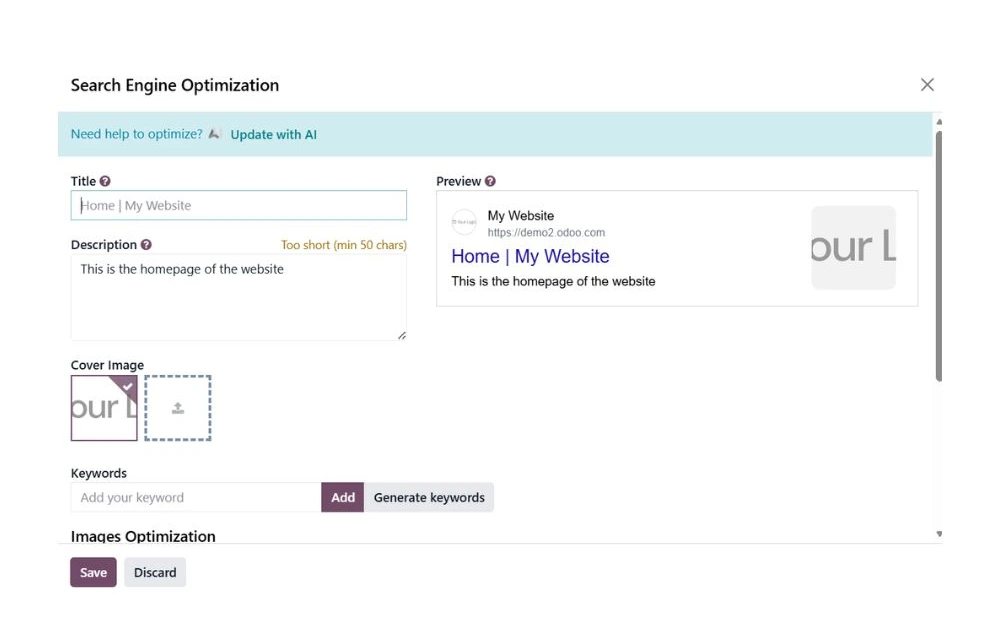
Use the blog to enhance visibility
The Blog module is an excellent tool for attracting qualified traffic.
A training session allows you to learn:
- to create an article;
- to structure the content;
- to optimize keywords;
- to work on internal linking.
The blog then becomes a true lever for visibility and acquisition.
Create a multilingual site with Odoo
Many companies are now working internationally.
The Odoo Website module allows you to manage multiple languages from a single platform.
This feature significantly simplifies site administration.
Add a new language
Users learn to:
- activate a language;
- translate content;
- manage language versions;
- publish changes.
Understand international SEO issues
The training also covers:
- hreflang tags;
- translated URLs;
- multilingual indexing;
- international SEO best practices.
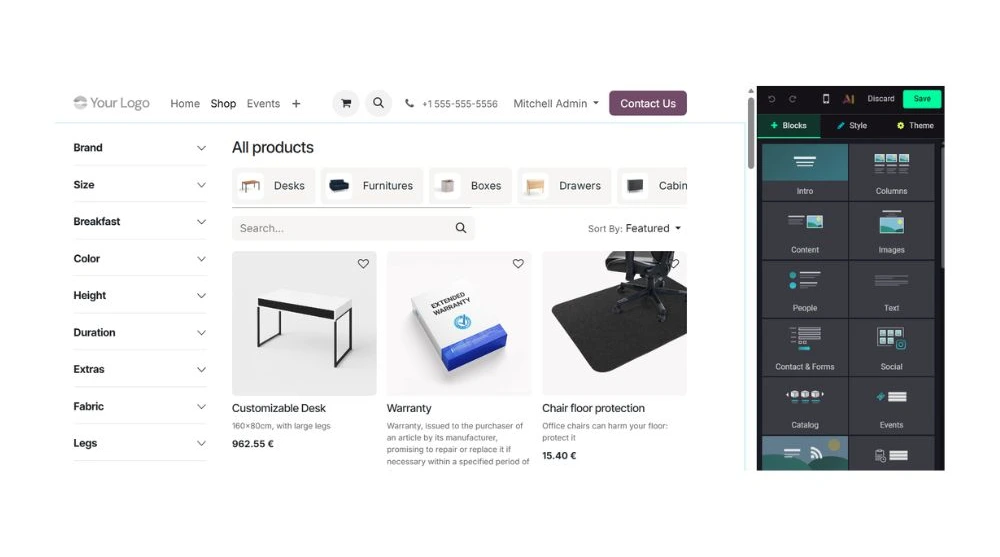
Develop an online store with the Odoo eCommerce module.
The Odoo Website module is not limited to creating showcase pages.
It also allows you to create a real online store directly connected to the entire ERP.
This integration is one of the main advantages of Odoo compared to many traditional eCommerce solutions.
Orders, inventory, payments, and customer data are centralized in a single platform.
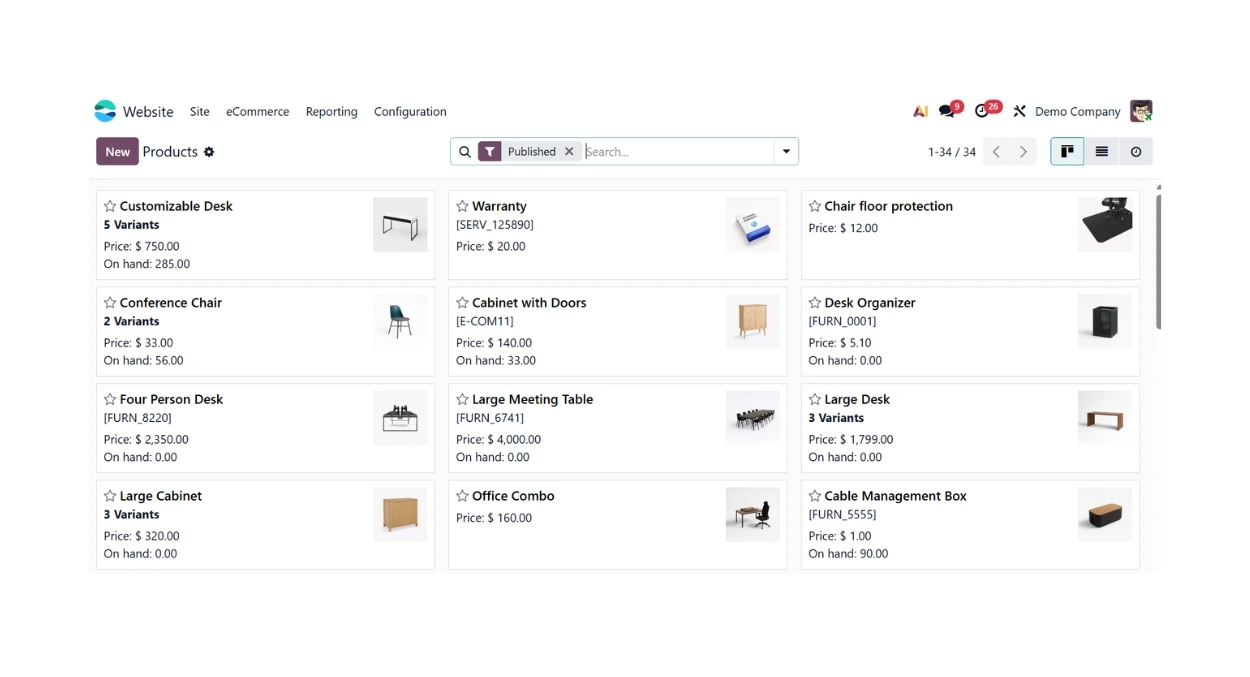
Create and manage your product catalog.
During an Odoo Website training, participants learn to:
- create a product sheet;
- add images;
- configure variants;
- set prices;
- organize categories.
The goal is to build a professional and easy-to-manage catalog.
Manage orders and payments.
A successful online store is not limited to displaying products.
Users also discover how to:
- manage customer orders;
- track payments;
- configure delivery methods;
- automate certain administrative tasks.
Thanks to the native integration with other Odoo modules, information flows automatically between sales, logistics, and accounting teams.
Optimize the shopping experience.
The training covers best practices to improve conversion:
- quality of product sheets;
- category structure;
- calls to action;
- reassurance;
- purchase journey.
These elements directly contribute to the performance of the online store.
Understanding the benefits of eCommerce connected to ERP
In many companies, the online store is managed by a platform separate from the rest of the information system.
This situation often leads to:
- complex synchronizations;
- duplicate entries;
- risk of errors;
- a waste of time.
With Odoo, all data is centralized.
Users learn to fully leverage this integration to improve the daily management of their business.
Creating high-performing landing pages with Odoo
Landing pages play a crucial role in lead generation.
Unlike standard pages, they are designed to achieve a specific goal:
- request a demo;
- download a guide;
- register for an event;
- schedule an appointment.
Structuring a conversion-oriented page
Participants discover:
- content organization;
- calls to action;
- reassurance elements;
- conversion forms.
Measuring performance
A landing page must be analyzed and optimized.
Users learn to track:
- visits;
- submitted forms;
- conversion rates;
- overall performance.
Table of skills developed during an Odoo Website training
| Skill | User level | Advanced level |
|---|---|---|
| Edit a page | ✓ | ✓ |
| Create a page | ✓ | ✓ |
| Add content | ✓ | ✓ |
| Create a form | ✓ | ✓ |
| Manage an eCommerce store | ✓ | ✓ |
| Optimize SEO | ✓ | |
| Manage multiple languages | ✓ | |
| Connect the CRM | ✓ | |
| Create a landing page | ✓ |
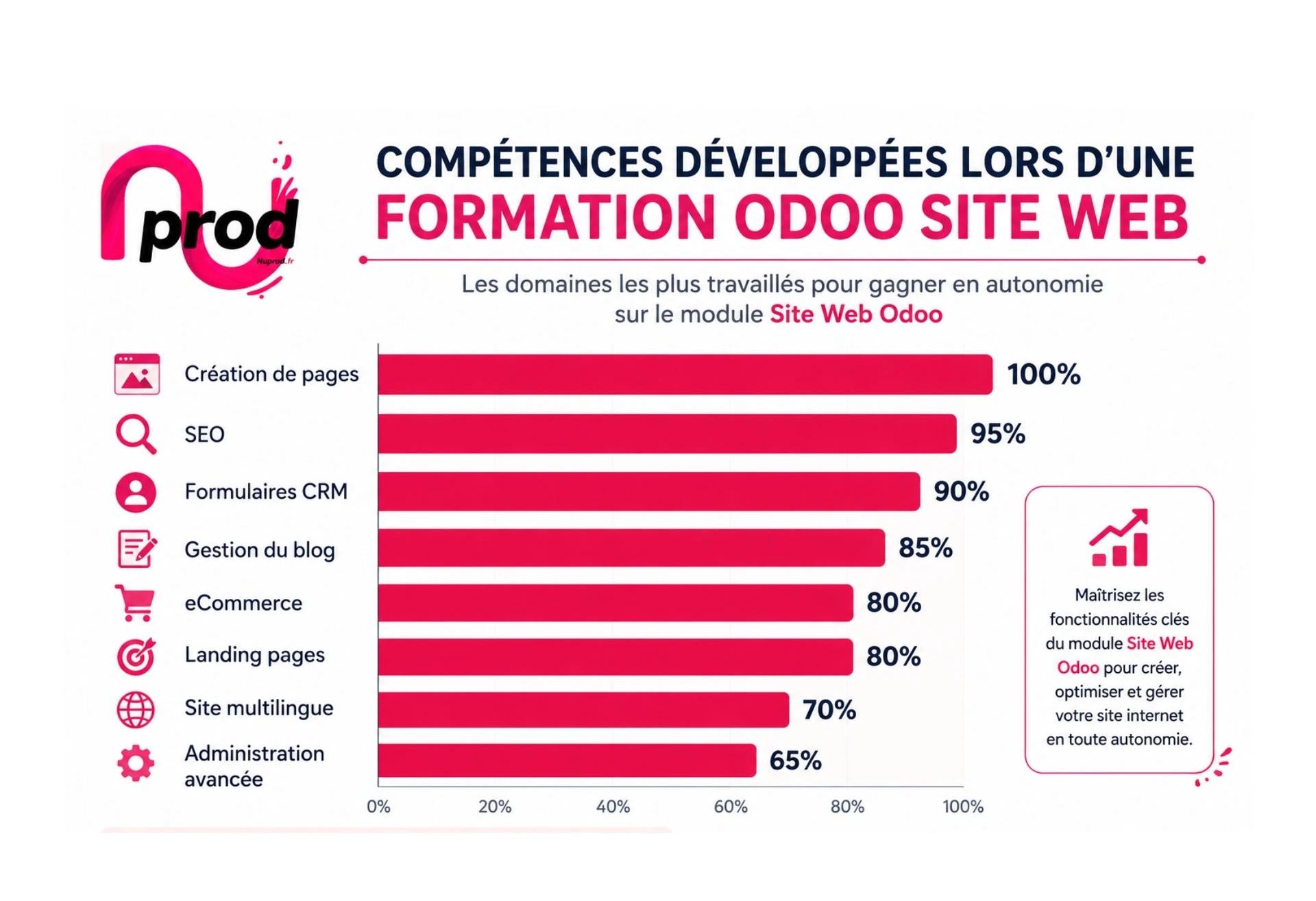
Real case: becoming self-sufficient on your Odoo website
Let's take the example of a small business that wants to improve its visibility.
Before the training:
- every change requires the intervention of a service provider;
- content is rarely updated;
- forms are underutilized;
- SEO opportunities are limited.
After the training:
- teams publish regularly;
- forms are optimized;
- landing pages are created in-house;
- the eCommerce store is managed independently;
- the site evolves much more quickly.
The company gains autonomy while reducing its management costs.
This skills enhancement is often one of the main benefits observed after an Odoo Website training.
FAQ – Odoo Website Training
How long does it take to learn how to use the Odoo Website module?
The duration depends on your starting level and your goals.
For a user wanting to manage their site's content, a few hours of training is usually enough to master the essential functions:
- creating pages;
- editing content;
- publishing articles;
- managing media.
For more advanced needs, such as SEO, CRM forms, multilingual support, or eCommerce, a more comprehensive training path is recommended.
Do I need to know how to code to use the Odoo Website module?
No.
The Odoo Website module is designed to allow users to create and manage a website without any development knowledge.
The drag-and-drop visual editor makes it easy to add:
- text;
- images;
- videos;
- forms;
- action buttons.
Training is specifically designed to help you get familiar with these features and acquire best practices.
Can I manage my website alone after the training?
That is precisely the goal.
Odoo Website training aims to make users independent in the daily management of their site.
At the end of the training, you are generally able to:
- create new pages;
- update your content;
- publish articles;
- manage your forms;
- administer your online store.
This way, you gain responsiveness and reduce your dependence on external providers.
Does the training cover search engine optimization (SEO)?
Yes.
Search engine optimization is now a major issue for businesses.
An Odoo Website training allows you to understand:
- the basics of SEO;
- page optimization;
- SEO tags;
- good writing practices;
- using the blog as an acquisition lever.
The goal is to help you improve your site's visibility on search engines.
Can you learn to create an online store with Odoo?
Yes.
The eCommerce module is an integral part of the training scope.
You will learn to:
- create products;
- manage categories;
- configure variants;
- track orders;
- administer your catalog.
This skill is particularly useful for businesses that want to centralize their commercial activity in Odoo.
Is the training suitable for marketing teams?
Absolutely.
Marketing managers are often the main users of the Website module.
The training allows them to:
- create campaigns;
- publish content;
- improve SEO;
- design landing pages;
- generate more leads.
The goal is to empower them to act quickly and effectively on the website.
Why invest in Odoo Website training?
The website is now much more than just a showcase.
It plays a central role in visibility, lead generation, and business development for the company.
Yet, many organizations only exploit a fraction of the possibilities offered by the Odoo Website module.
By developing your teams' skills, you enable them to:
- gain autonomy;
- publish more quickly;
- improve the site's SEO;
- optimize forms and conversions;
- manage a multilingual site;
- run an eCommerce store;
- fully leverage the Odoo ecosystem.
This skills enhancement represents a sustainable investment that benefits the entire company.
Train on the Odoo Website module with Nuformations
At Nuformations, we support Odoo users in enhancing their skills across all features of the Website module.
Our training is designed to be:
- practical;
- business-oriented;
- tailored to your level;
- directly applicable in your environment.
Whether you want to create a new site, improve your SEO, develop an online store, or gain autonomy on Odoo, our trainers will guide you step by step.
Request a free hour of Odoo Website training
Discover a path tailored to your needs and those of your teams.
Talk with a trainer
Let's discuss your goals, your current level, and the skills you want to develop.